
Request headers
Every Sozuri API call accepts the same small set of HTTP headers. Send the right Authorization, Content-Type and (optionally) Accept, and you’re ready to go.
Standard headers
| Header | Required | Type | Description |
|---|---|---|---|
| Authorization | Yes | String |
Bearer token containing your project’s API key, for example Bearer Your_API_Key. Remember the single space between Bearer and the key.
If you prefer, you can omit this header and pass apiKey inside the request body (JSON) or query string — see Authentication.
|
| Content-Type | Yes | String | Format of the request body. Use application/json for JSON payloads, or application/x-www-form-urlencoded for form submissions. |
| Accept | No | String | The format you’d like the response in. Defaults to application/json. |
Example request
A typical authenticated POST looks like this:
POST /api/v1/messaging HTTP/1.1
Host: sozuri.net
Authorization: Bearer LOx5JPdqf0lvf45EZAQMJm85OSUzyxR9X9XDJ4PFxRqVrt9dx83cWiwfTQMF
Content-Type: application/json
Accept: application/json

{
    "project": "Galaxion Marketing",
    "from": "MySenderID",
    "to": "254700000001",
    "message": "Hello, world.",
    "type": "transactional"
}
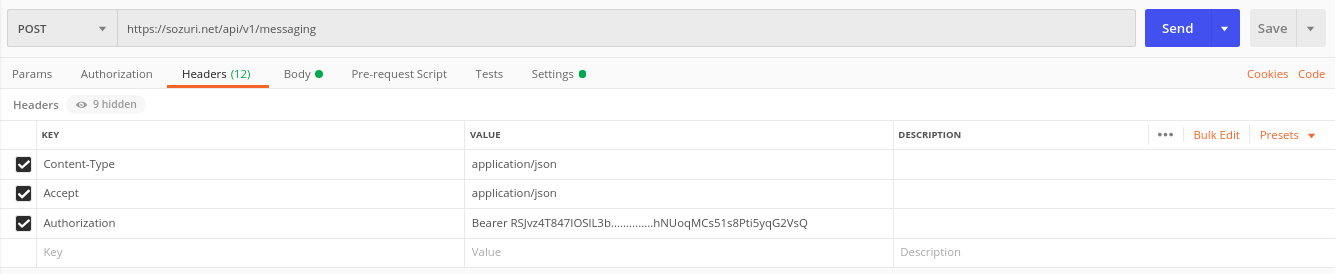
Postman screenshot
Here are the same headers set up in Postman:
Use cases
Quick reference for the most common header combinations.
JSON API call
Set Content-Type: application/json and Authorization: Bearer …. The cleanest choice for modern backends — the API key stays out of the body and URL.
Form-encoded webhook reply
If you’re posting from a legacy system that can’t build JSON, send application/x-www-form-urlencoded with the same fields and put apiKey in the body.
XML responses
Set Accept: application/xml and Sozuri will return the response in XML — handy when integrating with older enterprise systems.
Headers in hand. Send a message.
Try the Bulk SMS or WhatsApp endpoints next, or grab a ready-made request from the code samples.