
Payments API — Sozuri Zuka
Sozuri Payments enable a Paybill/Till holder to collect M-Pesa payments via STK Push. Bring your Daraja credentials, plug them in once, and Sozuri handles:
- Payment collection via links, QR code, or API.
- Sending an SMS to the customer and every number in numbers_to_notify for each transaction. Each SMS includes a shared OTP — the cashier can ask for it to verify the customer really paid, preventing fake-screenshot fraud.
- Forwarding payment details to your configured webhook URL automatically.
- Setup — Bring Your Own Shortcode
- Initiate STK Push
- Payment webhook callback
- Poll payment status
- Dynamic payment links
Setup — Bring Your Own Shortcode
Register your M-Pesa credentials in your project’s Payments settings. You’ll need a Daraja API application from developer.safaricom.co.ke and an M-Pesa admin account at org.ke.m-pesa.com. To set these up, follow the steps below:
- Apply for a Till/Paybill number by visiting a Safaricom shop or via m-pesaforbusiness.co.ke. (For assistance, the M-PESA Business Team contacts are: 0722 002 222, e-mail: M-PESABusiness@safaricom.co.ke.)
- Once approved, you’ll receive:
- Your Till/Paybill number.
- Access to the M-PESA Business admin portal (org.ke.m-pesa.com) — if this is missing, contact the team above.
- Create an assistant role user in the Business admin portal for Daraja verification.
- Create a developer account at the Daraja portal: developer.safaricom.co.ke.
- Create a sandbox app and select the “Lipa Na M-Pesa Sandbox and Paybill Sandbox” API.
- Get your Consumer Key and Consumer Secret.
- Click “Go Live” and select verification by shortcode.
- Enter the assistant username (created above) and select your desired API products.
- You’ll receive production credentials and a passkey on the Daraja portal or via email.
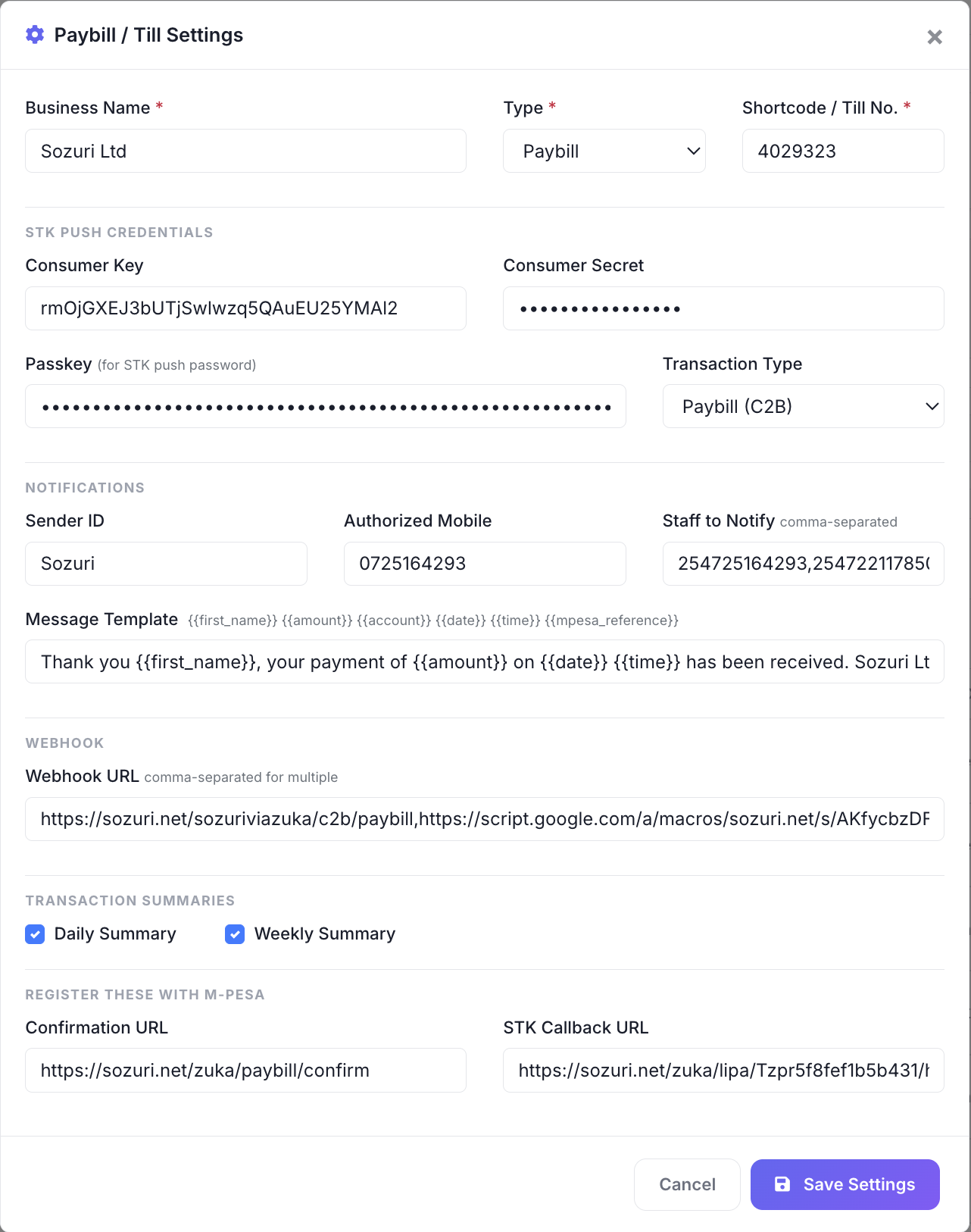
Now you have your Paybill/Till No., Consumer Key, Consumer Secret, and Passkey. Add them to Sozuri › Payments › Configure as shown in the image below. You are set!
| Field | Required for STK | Description |
|---|---|---|
| Business Short Code | Yes | Your M-Pesa paybill or till number. |
| Consumer Key | Yes | From your Daraja API application. |
| Consumer Secret | Yes | From your Daraja API application. |
| Passkey | Yes | From your Daraja STK Push setup. |
| Webhook URL | Optional | Your endpoint to receive confirmed payment notifications. |
| Notification Numbers | Optional | Comma-separated numbers (cashier, manager) that receive SMS alerts on every payment. |
Open your project’s Payments menu and click Configure in the top right to fill in the credentials:
1. Initiate STK Push
This sends an M-Pesa payment prompt directly to your customer’s phone. They enter their M-Pesa PIN and Sozuri handles the rest — recording the transaction, sending SMS notifications, and forwarding the confirmation to your webhook.
Request parameters
| Field | Required | Type | Description |
|---|---|---|---|
| phone | Yes | String | The customer’s Kenyan phone number in any format (07xx, 254xx, +254xx). Sozuri normalises it. |
| amount | Yes | Integer | Amount in KES. Minimum 1. |
| account_reference | No | String | Max 12 characters. Invoice number, student ID, anything you want to see on the M-Pesa statement. Defaults to your project code. |
Sample request
POST /api/v1/zuka/push HTTP/1.1
Host: sozuri.net
Authorization: Bearer YOUR_PROJECT_API_KEY
Content-Type: application/json
Accept: application/json

{
    "phone": "0712345678",
    "amount": 500,
    "account_reference": "INV-001"
}
<?php
$curl = curl_init();
curl_setopt_array($curl, [
CURLOPT_URL => 'https://sozuri.net/api/v1/zuka/push',
CURLOPT_RETURNTRANSFER => true,
CURLOPT_POST => true,
CURLOPT_POSTFIELDS => json_encode([
'phone' => '0712345678',
'amount' => 500,
'account_reference' => 'INV-001',
]),
CURLOPT_HTTPHEADER => [
'Authorization: Bearer YOUR_PROJECT_API_KEY',
'Content-Type: application/json',
'Accept: application/json',
],
]);
$response = curl_exec($curl);
curl_close($curl);
$result = json_decode($response, true);
echo $result['checkout_request_id'];const response = await fetch('https://sozuri.net/api/v1/zuka/push', {
method: 'POST',
headers: {
'Authorization': 'Bearer YOUR_PROJECT_API_KEY',
'Content-Type': 'application/json',
'Accept': 'application/json',
},
body: JSON.stringify({
phone: '0712345678',
amount: 500,
account_reference: 'INV-001',
}),
});
const data = await response.json();
console.log(data.checkout_request_id);import requests
response = requests.post(
"https://sozuri.net/api/v1/zuka/push",
headers={
"Authorization": "Bearer YOUR_PROJECT_API_KEY",
"Content-Type": "application/json",
"Accept": "application/json",
},
json={
"phone": "0712345678",
"amount": 500,
"account_reference": "INV-001",
},
)
print(response.json())curl --request POST 'https://sozuri.net/api/v1/zuka/push' \
--header 'Authorization: Bearer YOUR_PROJECT_API_KEY' \
--header 'Content-Type: application/json' \
--header 'Accept: application/json' \
--data '{
"phone": "0712345678",
"amount": 500,
"account_reference": "INV-001"
}'Success response (200)
{
    "message": "STK push sent. Prompt your customer to check their phone.",
    "checkout_request_id": "ws_CO_22042026115226183725164293",
    "merchant_request_id": "7ddc-4cfc-bb79-a1658fc680ae20423067"
}
Error response (422)
{
    "error": "No active paybill with STK credentials found for this project."
}
Payment webhook callback
When a payment is confirmed, Sozuri POSTs to the webhook URL you set in your payment settings. The payload mirrors the M-Pesa C2B structure for easy parsing.
Webhook body
{
    "TransactionType": "Pay Bill",
    "TransID": "QGH7JKLM2P",
    "TransTime": "20260422115226",
    "TransAmount": "500.00",
    "BusinessShortCode": "123456",
    "BillRefNumber": "INV-001",
    "InvoiceNumber": "",
    "OrgAccountBalance": "",
    "ThirdPartyTransID": "",
    "MSISDN": "254712345678",
    "FirstName": "John",
    "MiddleName": "",
    "LastName": "Doe"
}
Poll payment status
After initiating an STK Push, poll this endpoint to check whether the customer has completed the payment. Useful when your application can’t accept inbound webhooks.
confirmed or fail.
| Status | Meaning |
|---|---|
| pending | Waiting for the customer to enter their PIN, or for M-Pesa’s callback. |
| confirmed | Payment successful — trans_id and amount are populated. |
| fail | Customer cancelled, the request timed out, or the wallet had insufficient funds. |
Request
curl https://sozuri.net/zuka/pay/YOUR_PAYBILL_CODE/status/ws_CO_22042026115226183725164293Sample responses
// Pending
{ "status": "pending", "trans_id": null, "amount": null }

// Confirmed
{ "status": "confirmed", "trans_id": "QGH7JKLM2P", "amount": "500.00" }

// Failed
{ "status": "fail", "trans_id": null, "amount": null }
2. Dynamic payment links
Every configured paybill automatically gets a hosted payment page anyone can open and pay from — no code required.
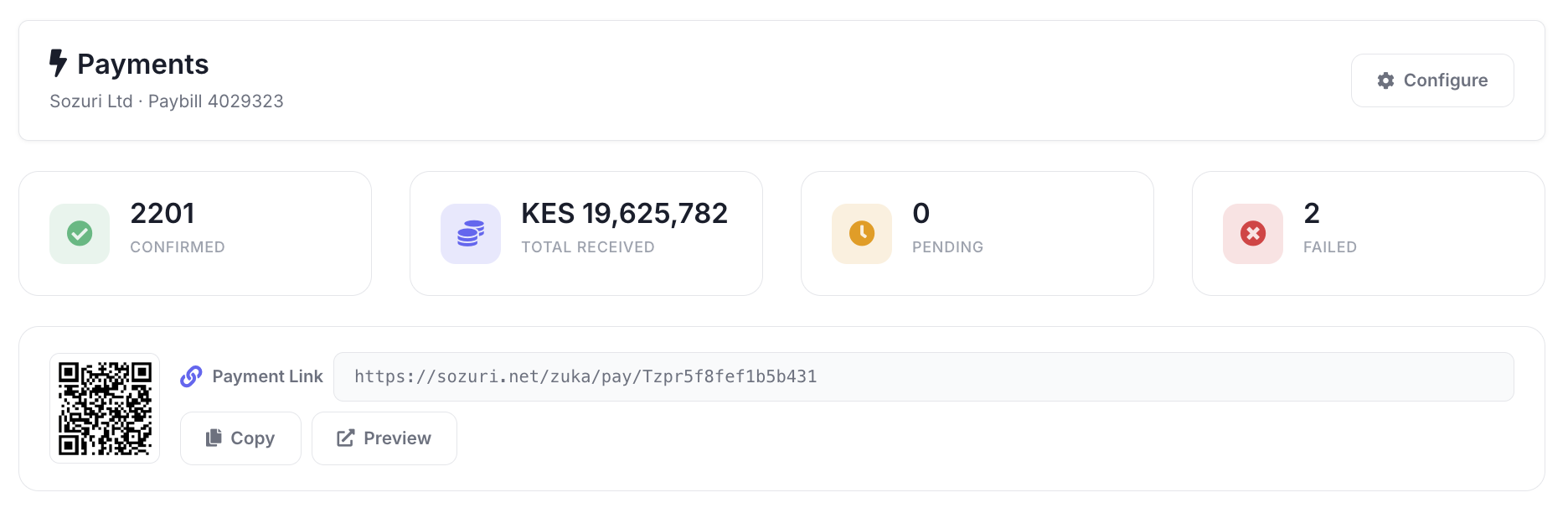
https://sozuri.net/zuka/pay/{your-paybill-code}The customer opens the link, enters their phone number and amount, and receives an STK Push. The page polls for confirmation and shows live status — perfect when you want a payment URL you can share over WhatsApp, print on a receipt, or embed in a portal.
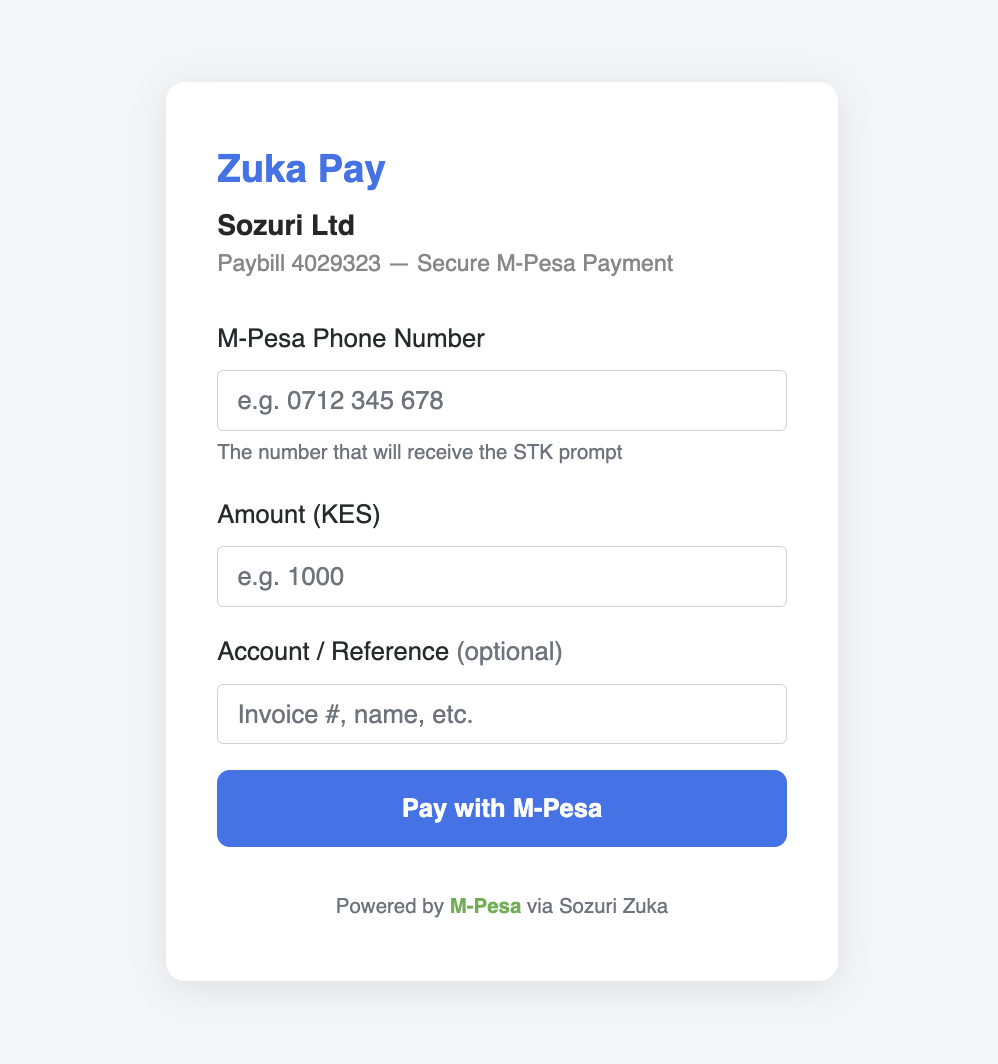
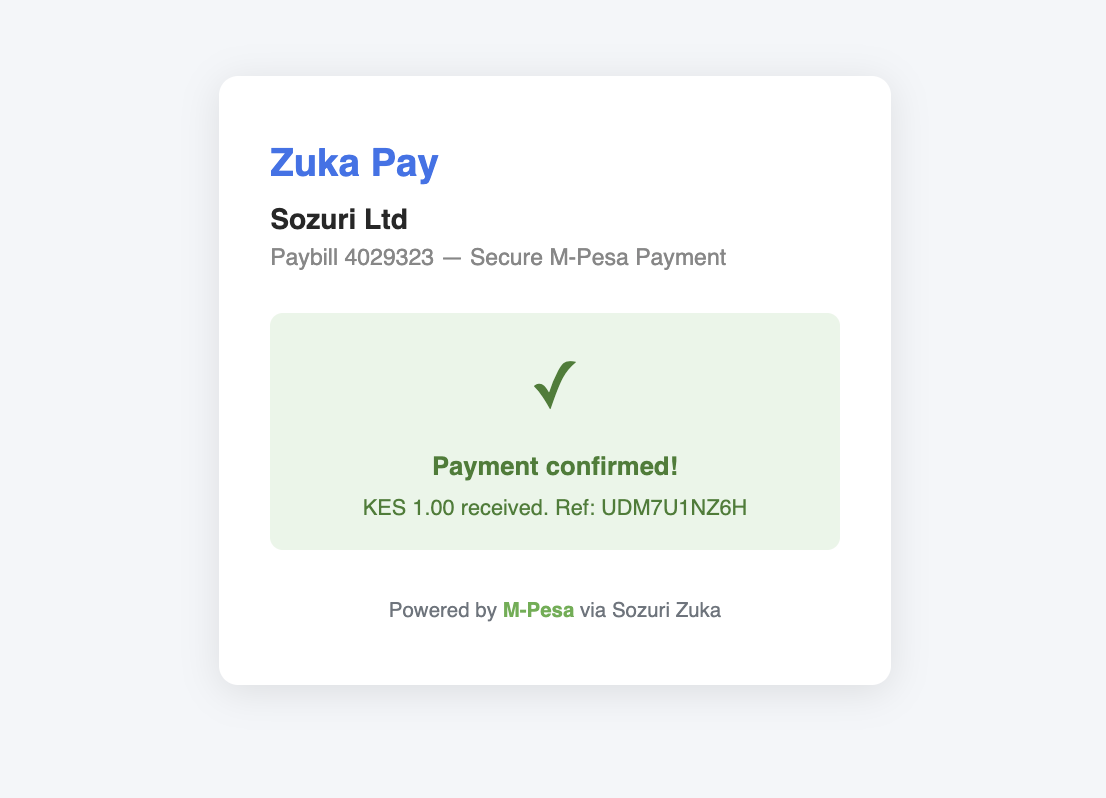
Find your payment link in your project’s Payments dashboard. Copy it, share it, or click to test.
Use cases
Where teams plug Sozuri Zuka into their day-to-day collections.
E-commerce checkout
Trigger an STK on the customer’s phone at checkout, listen for the webhook, and ship as soon as it’s confirmed.
WhatsApp / SMS payment links
Share a hosted Zuka link in a conversation — the customer pays in their browser without any technical effort on your side.
https://zuka.sozuri.net/inv/4821 11:02
QR codes on receipts & tables
Print the Zuka link as a QR code on receipts, restaurant tables, donation boxes — customers scan, pay, leave.
School fees & event tickets
Use account_reference for the student ID or ticket number — reconciliation becomes a one-line database join.
Collect M-Pesa in under an hour.
Bring your Daraja credentials, plug them into a Sozuri project, and send your first STK Push from the dashboard or API today.